

Publishing a website is easy. Getting it to appear in Google search results for the right keywords is much harder.
You may have published several articles, optimized your titles, added keywords, and even built backlinks, yet your website still receives little or no organic traffic. In some cases, individual pages appear in Google but remain buried beyond the first few pages of search results.
The problem is not always a lack of backlinks or poor content. Your pages might not be indexed, your content might not match what people are searching for, or Google might have better answers to show users.
The fastest way to improve rankings is to identify the actual problem before making changes.
This guide explains 12 common reasons a website fails to rank on Google, how to check each issue, and what you can do to fix it.
1. Your Website Pages Are Not Indexed
A page generally needs to be indexed before it can appear in Google’s organic search results. If Google has not indexed your page, improving its keyword placement alone will not solve the problem.
New websites, recently published articles, and websites with technical errors can experience indexing delays or problems.
How to check
Open Google Search Console and inspect the URL using the URL Inspection tool. Check whether Google has indexed the page and review the reported indexing status.
You can also search Google using:
site:yourdomain.com
Replace yourdomain.com with your actual domain. This search can help you find indexed pages, although it is not a complete or definitive indexing report.
How to fix it
- Make sure the page returns a successful HTTP status, normally 200.
- Check that the page does not contain an unintended
noindexdirective. - Review the page’s robots.txt rules.
- Include important, canonical URLs in your XML sitemap.
- Add internal links from relevant, already accessible pages.
- Use URL Inspection to request indexing when appropriate.
Requesting indexing does not guarantee that Google will index or rank a page. Google makes that decision based on its systems and the page’s suitability.
Important: Do not repeatedly submit the same URL without investigating the reported problem. Fix the underlying issue first.
2. Your Content Does Not Match Search Intent

A page can contain accurate information and still struggle to rank if it does not answer the question behind the search.
For example, someone searching for “how to fix slow website speed” probably wants a practical troubleshooting guide. A page that mainly promotes a website development service may not satisfy that need.
Similarly, someone searching for “best email marketing tools” is likely comparing products, features, and prices rather than looking for a basic definition of email marketing.
How to check
Search your target keyword in Google and study the pages that consistently appear near the top.
Look for patterns:
- Are the results tutorials, product pages, comparison articles, or service pages?
- Do they answer the question immediately?
- Are readers expecting step-by-step instructions, examples, or recommendations?
- What important information do several relevant results cover?
Do not copy competitors’ articles. Use the results to understand what searchers expect.
How to fix it
Rewrite the page around the user’s actual goal. Put the direct answer near the beginning, organize the supporting information logically, and remove sections that distract from the main question.
Your page should offer something useful beyond repeating the same points found everywhere else. This could include original testing, a practical checklist, a worked example, screenshots, or a clear decision-making process.
3. You Are Targeting Keywords That Are Too Competitive
A new website may struggle to rank for broad terms such as “SEO,” “digital marketing,” or “backlinks.” These queries can attract established websites with strong topical coverage, relevant links, and years of search visibility.
That does not mean a new website cannot compete. It means the initial keyword strategy needs to be realistic.
How to check
Review the first page of Google for your target keyword. Look at the relevance of competing pages, the depth of their content, their website authority signals, and the type of websites ranking.
Keyword difficulty scores from SEO tools can help with research, but they are estimates rather than Google’s ranking criteria.
How to fix it
Start with specific searches that reveal a clearer need.
For example, instead of targeting only “link building,” a new SEO website could create focused content around:
- How to evaluate a website before buying a guest post
- How to find competitor backlinks in a specific niche
- How to check whether a backlink is relevant
- How to compare link-building opportunities against a budget
These topics may have less competition, depending on the market, and can attract readers with more specific needs.
Do not assume every long-tail keyword is easy. Check the actual search results before choosing one.
4. Your Content Is Too Thin or Adds Little Original Value
Word count alone does not determine rankings. A concise page can perform well when it answers a question completely, while a lengthy article can fail if it repeats generic advice.
The real problem is content that leaves readers with the same questions they had before opening the page.
For example, telling readers to “build quality backlinks” is not very helpful without explaining how to evaluate relevance, editorial placement, link attributes, and the credibility of the referring website.
How to check
Read your article as if you had never visited your website before.
Ask:
- Does it answer the main question directly?
- Are important claims explained with examples or evidence?
- Can readers follow the recommendations without guessing the next step?
- Does the page contain useful information that is missing from generic summaries?
- Are the examples accurate and relevant to the topic?
How to fix it
Add depth where it solves a real reader problem. Use original observations, practical examples, clear instructions, relevant data, and trustworthy references where appropriate.
Remove repetitive paragraphs and unsupported claims. You do not need to make every article longer than competing pages; you need to make it more useful for its intended audience.
5. Your Website Has Technical SEO Problems

Technical issues can prevent Google from accessing, understanding, or selecting the correct version of a page.
Common examples include accidental noindex tags, incorrect canonical URLs, redirect chains, broken internal links, and important pages that are difficult to discover.
How to check
Use Google Search Console to review indexing reports and inspect affected URLs. Crawl your website with an SEO crawler if you have access to one.
Check the following:
- Important pages return the correct HTTP status.
- Canonical tags point to the intended versions.
- Redirects lead to the correct destination.
- Robots.txt is not blocking pages that need to be crawled.
- Important pages are linked from other relevant pages.
- XML sitemaps contain canonical URLs that should be indexed.
How to fix it
Prioritize errors that affect important landing pages. A broken page that generates leads deserves more immediate attention than an outdated tag on an unimportant page.
If your site runs on WordPress, review your SEO plugin settings and any recent theme or plugin changes. Avoid changing canonical tags, robots directives, or redirects without understanding their effects.
6. Your Website Is Slow or Difficult to Use on Mobile
A slow, frustrating website can discourage visitors from using it. Mobile usability problems can also make it harder for people to read content, navigate pages, or complete purchases.
Page experience matters, but improving speed does not guarantee a ranking increase. Relevance and other signals still matter.
How to check
Test important landing pages with Google PageSpeed Insights. Review both the mobile and desktop reports, paying attention to real-user Core Web Vitals data when available.
The current Core Web Vitals thresholds are:
- Largest Contentful Paint (LCP): 2.5 seconds or less.
- Interaction to Next Paint (INP): 200 milliseconds or less.
- Cumulative Layout Shift (CLS): 0.1 or less.
These thresholds are assessed at the 75th percentile of page visits. A lab test is useful for diagnosing problems, but it is not a substitute for field data.
How to fix it
- Compress large images and use modern formats such as WebP or AVIF where appropriate.
- Reduce unnecessary JavaScript and heavy third-party scripts.
- Use caching and a reliable hosting setup.
- Set image dimensions to reduce layout shifts.
- Make navigation, buttons, and forms usable on small screens.
- Avoid intrusive pop-ups that obstruct the main content.
Start with the problems identified by your performance reports rather than installing every speed plugin you can find.
7. Your Pages Are Competing Against Each Other
Keyword cannibalization happens when multiple pages target very similar search intent and compete for visibility. Having several pages about the same broad topic does not automatically cause a problem, but overlapping pages can create confusion about which URL best satisfies a query.
For example, a website might publish three articles that all target essentially the same question about finding competitor backlinks, with little difference in their purpose.
How to check
Search Search Console’s performance report for a query that matters to your website. Review which URLs receive impressions and clicks for that query.
If several pages appear for overlapping queries, compare their purpose, content, and search intent. Multiple URLs appearing in the report is not proof of cannibalization by itself.
How to fix it
Give each page a distinct purpose.
- Keep separate pages when they answer genuinely different questions.
- Improve internal links so they point to the most relevant page for each topic.
- Consolidate genuinely redundant pages when one stronger page can serve the same need.
- Use redirects when consolidation requires moving a URL.
- Update titles and content when a page is targeting the wrong intent.
Do not merge useful pages simply because they share a keyword. Make the decision based on user needs and the pages’ actual performance.
8. Your Website Has Too Few Relevant Backlinks
Backlinks can help search engines discover pages and understand how other websites reference your content. Relevant, editorially earned links can also help build credibility.
However, not every website needs a large backlink profile to rank. Some low-competition searches can be won through strong, relevant content and good site structure.
How to check
Review your backlink profile with a reputable SEO tool. Examine referring domains, the pages receiving links, the context of those links, and whether the linking websites are relevant to your topic.
Also review the backlink profiles of competing pages. The purpose is to identify realistic gaps, not to copy every link a competitor has.
How to fix it
Create content that other websites have a reason to reference, such as original research, useful resources, detailed tutorials, or industry-specific data.
You can also pursue relevant editorial outreach, digital PR, legitimate guest contributions, and partnerships where they make sense.
Avoid buying large quantities of low-quality links or using automated schemes designed to manipulate rankings. Paid placements should be handled in accordance with Google’s spam policies, including the appropriate use of rel="sponsored" or other relevant link attributes.
The goal is not simply to obtain more backlinks. It is to earn or acquire relevant references that make sense for your website and audience.
9. Your Internal Linking Is Weak
Internal links help visitors navigate your website and help search engines discover relationships between pages.
If an important article has no meaningful links pointing to it, it may be harder to discover than a page that is linked from relevant content throughout your website.
How to check
Identify your most important pages and review which other pages link to them.
Look for useful articles that discuss a related subject but do not link to the page where readers could find more detail.
How to fix it
Add contextual links where they genuinely help readers.
For example, an article about competitor backlink analysis could link to a detailed guide on backlink gap analysis. A general link-building guide could direct readers to a relevant article comparing guest posting and link insertions.
Use descriptive anchor text that explains the destination. Avoid forcing the same exact-match keyword into every link.
Internal links should help people understand the subject and move naturally through your website, not simply increase the number of links on each page.
10. Your Website Is Too New or Has Not Built Enough Topical Coverage
A new website may need time to be crawled, indexed, and evaluated. It may also lack the depth of coverage and reputation that established competitors have developed.
There is no fixed number of days after which a new website should rank. Some pages become visible quickly, while others take much longer or never achieve meaningful visibility.
How to check
Review when your key pages were published, whether they are indexed, and whether Search Console is beginning to show impressions for relevant queries.
Compare your website’s coverage with the questions your intended audience actually asks.
How to fix it
Build a focused collection of genuinely useful pages around a clear subject. For an SEO website, this could include technical SEO, keyword research, backlink analysis, internal linking, content optimization, and performance measurement.
Link related pages together and ensure that each one serves a distinct purpose.
Do not publish dozens of near-identical articles simply to make the website look active. A smaller, more useful content library is often a better starting point.
11. You Changed Your Website or Lost Existing Rankings
A ranking drop after a website redesign, URL migration, content update, or plugin change can indicate that something important changed.
Possible causes include missing redirects, altered canonical tags, removed internal links, deleted content, indexing restrictions, or a change in the relevance of a page.
However, rankings also fluctuate naturally, and a drop does not always mean that your website has a technical problem.
How to check
Open Google Search Console and compare the affected pages and queries before and after the decline. Look at clicks, impressions, average position, and the dates when changes occurred.
Review your website’s change history if available. Check whether the decline affects one page, a group of pages, or the entire site.
How to fix it
If the decline began after a website change, investigate that change first.
- Restore missing redirects where appropriate.
- Correct unintended indexing or canonicalization issues.
- Restore valuable content that was removed without a clear reason.
- Check whether internal links still point to the correct URLs.
- Compare the current content with what users need and what relevant search results offer.
If the decline coincides with a Google ranking update, do not immediately rewrite every page. Diagnose the pattern, review content quality and relevance, and make changes based on evidence.
12. You Are Measuring the Wrong SEO Results
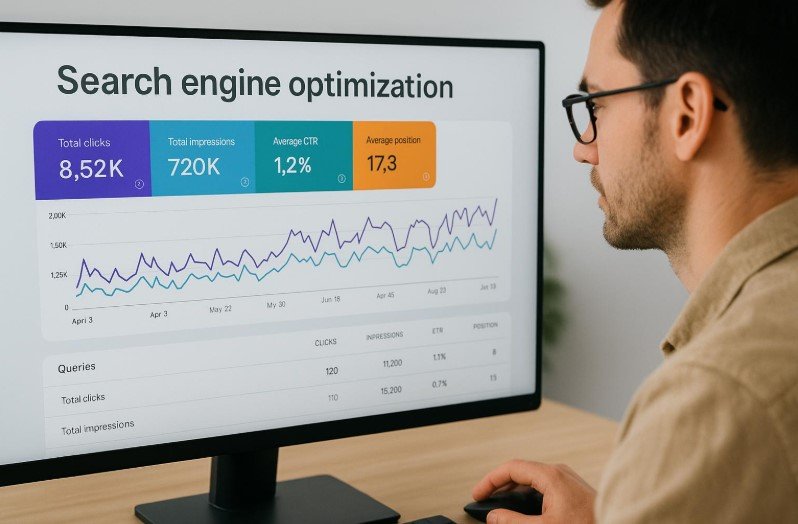
A page can rank for some keywords without generating valuable traffic. It can also receive impressions for relevant searches before earning many clicks.
If you monitor only a single keyword or an SEO tool’s estimated traffic score, you may miss what is actually happening.
How to check
Use Google Search Console to examine:
- Impressions: How often your pages appeared in search results.
- Clicks: How often users clicked through from Google Search.
- Click-through rate (CTR): The percentage of impressions that resulted in clicks.
- Average position: A summary of the page’s or site’s average ranking position for the selected data.
Use Google Analytics or another analytics tool to understand what visitors do after arriving on your website.
How to fix it
Match your next action to the problem.
If impressions are growing but clicks are low, review the query, title, description, and search-result presentation. A low CTR does not automatically mean your title is bad; the query and ranking position matter too.
If clicks are increasing but conversions are low, check whether the page attracts the right audience and whether the next step is clear.
If rankings are poor and impressions are limited, investigate indexing, relevance, competition, and the usefulness of the page before focusing on CTR.
SEO should be measured by relevant visibility, qualified visitors, and meaningful business outcomes-not rankings alone.
How to Diagnose Your Website’s Ranking Problem in 30 Minutes
You do not need to change your entire website to begin troubleshooting. Start with one important page and follow this order.
Step 1: Choose one page
Select a page that should attract relevant visitors or generate leads. Record its URL and the main query it is intended to answer.
Step 2: Check indexing
Use Search Console’s URL Inspection tool to check whether Google has indexed the page and whether any technical issues are reported.
Step 3: Review search performance
Open the Search Console performance report. Select the page and review its queries, impressions, clicks, and average position over a meaningful period.
Step 4: Compare search intent
Search the main query and study the pages appearing in the results. Identify whether your page answers the same question and whether it offers enough useful detail.
Step 5: Check the technical basics
Review the page’s status code, canonical tag, robots directives, mobile experience, and relevant performance reports.
Step 6: Choose one priority fix
Write down the strongest evidence you found and address the most likely cause first. For example, correct an indexing issue before spending time rewriting an already useful article.
Step 7: Measure the outcome
Record the date of the change and review the page’s performance over subsequent weeks. The time needed to see a result depends on the issue, the website, and Google’s crawling and ranking systems.
This process will not solve every SEO problem in 30 minutes. It will help you avoid wasting time on changes that have little connection to the actual cause.
Frequently Asked Questions
Why is my website not showing up on Google?
Your website or individual pages may not be indexed, may be blocked by technical settings, or may not be relevant enough to appear for the searches you expect. Start with Google Search Console’s URL Inspection tool to determine whether the page is indexed.
How long does it take for a website to rank on Google?
There is no guaranteed timeline. A page can gain visibility relatively quickly for some searches, while competitive keywords may require sustained improvements to content, site structure, and reputation. Some pages never reach the positions their owners want.
Can a website rank on Google without backlinks?
Yes. Pages can rank without backlinks, particularly for less competitive queries. Backlinks can help, but useful content, search intent, accessibility, and competition also influence results.
Does publishing more blog posts improve SEO?
Not automatically. Publishing relevant, helpful articles can expand your coverage and attract search traffic, but producing large amounts of repetitive or low-value content is not a reliable strategy. Prioritize content that serves a clear purpose.
Does updating old content improve rankings?
It can help when the update makes a page more accurate, useful, relevant, or complete. Changing dates or rewriting sentences without improving the content does not guarantee better rankings.
Why is my website getting impressions but no clicks?
Your page may appear for queries that do not match its purpose, rank too low to attract clicks, or present a less compelling search result than alternatives. Review the actual queries, ranking positions, and titles before making changes.
Do I need an SEO tool to fix ranking problems?
You can diagnose many important issues using Google Search Console, Google Analytics, and PageSpeed Insights. Paid SEO tools can provide additional keyword, competitor, and backlink data, but they are not essential for every task.
Should I buy backlinks to improve Google rankings?
Buying links intended to manipulate search rankings can violate Google’s spam policies. Focus on relevant editorial relationships, useful content, digital PR, and legitimate outreach. Paid placements should use appropriate link qualification.
Final Thoughts
When a website fails to rank, the answer is not always to publish more content or build more backlinks. The real issue could be indexing, search intent, technical SEO, weak internal linking, competition, or a page that attracts the wrong audience.
Start with evidence. Check whether Google can index your page, understand what people are searching for, compare your content with relevant results, and investigate the technical basics.
Then fix the highest-priority issue and measure the result before making more changes.
The goal is not to change everything about your website. It is to identify what is preventing the right pages from reaching the right people–and fix that problem first.

Leave a Reply